Wednesday, January 4, 2017

JAVA integration with twitter


JAVA integration with twitter


Go to the URL https://apps.twitter.com/ and create a new application. Give access level in ‘Settings’ as ‘Read, Write and Access direct messages’. You will get both consumer key and secret.

And  go to settings and check the permissions to read write and direct messages

Get

Consumer Key

Consumer Secret

see the screen


And also generate by clicking on generate access token it will display

Access Token
Access Token Secret.


Add dependency

<dependency>
<groupId>org.twitter4j</groupId>
<artifactId>twitter4j-core</artifactId>
<version>4.0.2</version>
</dependency>

Or 
 
Else we can add jar twitter4j-core


Code:


import twitter4j.Twitter;
import twitter4j.TwitterException;
import twitter4j.TwitterFactory;
import twitter4j.auth.AccessToken;

public class JavaTweet {

static String consumerKeyStr = "PASTE CONSUMER KEY HERE";
static String consumerSecretStr = "PASTE CONSUMER SECRET HERE";
static String accessTokenStr = "PASTE ACCESS TOKEN HERE";
static String accessTokenSecretStr = "PASTE ACCESS TOKEN SECRET HERE";

public static void main(String[] args) {

try {
Twitter twitter = new TwitterFactory().getInstance();

twitter.setOAuthConsumer(consumerKeyStr, consumerSecretStr);
AccessToken accessToken = new AccessToken(accessTokenStr,
accessTokenSecretStr);

twitter.setOAuthAccessToken(accessToken);

twitter.updateStatus("TWEET ON TWITTER EXAMPLE");

System.out.println("Successfully updated the status in Twitter.");
} catch (TwitterException te) {
te.printStackTrace();
}
}

}


That’s great. We have done it.
______________________________________________________________________________

We have also a neither way to tweet using java by Twitter REST API. For that we need

commons-codec-1.6.jar
  • commons-io-2.4.jar
  • commons-logging-1.1.3.jar
  • httpclient-4.3.1.jar
  • httpcore-4.3.jar
  • signpost-core-1.2.1.2.jar
  • signpost-commonshttp4-1.2.1.2.jar
All these jar files.


And code is as follows.


import oauth.signpost.OAuthConsumer;
import oauth.signpost.commonshttp.CommonsHttpOAuthConsumer;

import org.apache.commons.io.IOUtils;
import org.apache.http.HttpResponse;
import org.apache.http.client.HttpClient;
import org.apache.http.client.methods.HttpPost;
import org.apache.http.impl.client.DefaultHttpClient;

public class JavaRestTweet {
static String consumerKeyStr = "PASTE CONSUMER KEY HERE";
static String consumerSecretStr = "PASTE CONSUMER SECRET HERE";
static String accessTokenStr = "PASTE ACCESS TOKEN HERE";
static String accessTokenSecretStr = "PASTE ACCESS TOKEN SECRET HERE";


public static void main(String[] args) throws Exception {
OAuthConsumer oAuthConsumer = new CommonsHttpOAuthConsumer(consumerKeyStr,
consumerSecretStr);
oAuthConsumer.setTokenWithSecret(accessTokenStr, accessTokenSecretStr);

HttpPost httpPost = new HttpPost(
"http://api.twitter.com/1.1/statuses/update.json?status=Hello%20Twitter%20Exammple.");

oAuthConsumer.sign(httpPost);

HttpClient httpClient = new DefaultHttpClient();
HttpResponse httpResponse = httpClient.execute(httpPost);

int statusCode = httpResponse.getStatusLine().getStatusCode();
System.out.println(statusCode + ':'
+ httpResponse.getStatusLine().getReasonPhrase());
System.out.println(IOUtils.toString(httpResponse.getEntity().getContent()));

}
}


That’s great. We have done it.

Small JS to LOGIN to FB and POST on ur wall


<html xmlns="http://www.w3.org/1999/xhtml" xmlns:fb="http://www.facebook.com/2008/fbml"><head><meta http-equiv="Content-Type" content="text/html; charset=windows-1251">
<title>Posting Job Opening To FB Wall</title>
<script type="text/javascript" src=""></script>
    </head>
    <body class="">
    <div id="fb-root" class=" fb_reset">
    <script>
var APP_ID="APP ID HERE";

window.fbAsyncInit = initFacebook;

function initFacebook()
{
    FB.init({
      appId  : APP_ID,
      status : true, // check login status
      cookie : false, // enable cookies to allow the server to access the session
      xfbml  : true  // parse XFBML
    });

    FB.getLoginStatus(onFacebookLoginStatus);
};

(function() {
    var e = document.createElement('script');
    e.src = document.location.protocol + '//connect.facebook.net/en_US/all.js';
    e.async = true;
    document.getElementById('fb-root').appendChild(e);
    }());
    //the login function
function facebookLogin()
{
    var loginUrl="http://www.facebook.com/dialog/oauth/?"+
        "scope=publish_actions&"+
        "client_id="+APP_ID+"&"+
        "redirect_uri="+document.location.href+"&"+
        "response_type=token";
    window.location=loginUrl;
}


//Callback function for FB.login
function onFacebookLoginStatus(response)
{
    if (response.status=="connected" && response.authResponse)
    {
        document.getElementById("txtEcho").innerHTML="Logged in.";

    }
    else
    {
        document.getElementById("txtEcho").innerHTML="Not logged in.";
    }

}


    //post to wall function
function postToWallUsingFBApi()
{
  
 FB.ui({
method: 'feed',
link: 'http://Examplesite.net/join-us/',
description:'Example description',
caption: 'Example Caption',
}, function(response){});

}

    //the return function after posting to wall
function onPostToWallCompleted(response)
{
    if (response)
    {
        if (response.error)
        {
            document.getElementById("txtEcho").innerHTML=response.error.message;
        }
        else
        {
            if (response.id)
                document.getElementById("txtEcho").innerHTML="Posted as post_id "+response.id;
            else if (response.post_id)
                document.getElementById("txtEcho").innerHTML="Posted as post_id "+response.post_id;
            else
                document.getElementById("txtEcho").innerHTML="Unknown Error";
        }
    }
}


    </script>
    <input id="loginButton" type="button" value="Login To Facebook" onclick="javascript:facebookLogin();">
    <input id="postToWallWithFBApiPrompt" type="button" value="Post To Wall Using FB.api"          onclick="javascript:postToWallUsingFBApi();">
    <div id="txtEcho"><b></b></div>
    </body>
    </html>

Integration with Facebook Using java


Intigration with Facebook Using java


First we need register our app in

And in settings put domains as
https://sssss.com

And there we can get the appid and Secret Key

APPID
XXXXXXXXXXXXXX

Secret key
XXXXXXXXXXXXXXXX


And after settings all these go to


And login with the credentials

After that click on the down arrow on get token, after that click on the checkbox publish_actions and click on get token after that token will generate. Copy that token and paste the token in the program.

Run the program.

Post will be posted on the user who has been logged in.


Maven dependency

<dependency>
<groupId>org.scribe</groupId>
<artifactId>scribe</artifactId>
<version>1.3.2</version>
</dependency>


JAVA Code

package com.restfb.example;


import org.scribe.builder.ServiceBuilder;
import org.scribe.builder.api.FacebookApi;
import org.scribe.model.*;
import org.scribe.oauth.OAuthService;

import java.text.SimpleDateFormat;
import java.util.Date;
import java.util.Scanner;

public class SharePostOnFacebookWallTimeline {

private static String FB_APP_KEY = "APPID HERE";
private static String FB_APP_SECRET = "APP SECRET HERE";

private static OAuthService getOAuthService()
{
return new ServiceBuilder()
.provider(FacebookApi.class)
.apiKey(FB_APP_KEY)
.apiSecret(FB_APP_SECRET)
.callback("https://yoursite.net/")
.build();
}


private static void postOnFacebookWallTimeline (OAuthService oAuthService, Token accessToken)
{
OAuthRequest request = new OAuthRequest(Verb.POST, "https://graph.facebook.com/me/feed");
SimpleDateFormat sdf = new SimpleDateFormat("EEE, d MMM yyyy HH:mm:ss Z");
String message = "Welocme to Techwave here we are Having 5 oepenings on JAVA - " + sdf.format(new Date());
request.addBodyParameter("message", message);
String link = "https://yoursite.net";
request.addBodyParameter("link", link);
oAuthService.signRequest(accessToken, request);

Response response = request.send();
System.out.println(response.getCode());
String responseBody = response.getBody();
System.out.println(responseBody);
}

public static void main(String[] args)
{
OAuthService oAuthService = getOAuthService();

Token accessToken, accessToken1;

//facebook app's short-lived access token
//accessToken = getFbAppShortLivedAccessToken(oAuthService);
//accessToken = new Token("0123456789abcdef0123456789abcdef0123456789abcdef0123456789abcdef", "");

//facebook app's long-lived access token
//accessToken1 = getFbAppLongLivedAccessToken(oAuthService, accessToken);
accessToken = new Token("Paste accesstoken here", "");

//postOnFacebookWallTimeline(oAuthService, accessToken1);
postOnFacebookWallTimeline(oAuthService, accessToken);

}

}


Tuesday, September 27, 2016

Unable to start Eclipse - can't open \Java\jre7\lib\..\jvm.cfg


Unable to start Eclipse — can't open \Java\jre7\lib\..\jvm.cfg

Problem is we have uninstalled our reinstalled java.
Solution is We need to point to that java location.

And for that we need to modify eclipse.ini which is present in the eclipse folder..

And add the path accordingly at the bold letters

-startup
plugins/org.eclipse.equinox.launcher_1.2.0.v20110502.jar
--launcher.library
plugins/org.eclipse.equinox.launcher.win32.win32.x86_1.1.100.v20110502
-product
org.eclipse.epp.package.java.product
--launcher.defaultAction
openFile
--launcher.XXMaxPermSize
256M
-showsplash
org.eclipse.platform
--launcher.XXMaxPermSize
256m
--launcher.defaultAction
openFile
-vm
C:\Java\JDK\1.8\bin\javaw.exe

-vmargs
-Dosgi.requiredJavaVersion=1.5
-Xms40m
-Xmx1024m

Friday, September 23, 2016

Setting Path for Java in Environmental Variables


Environmental variables are used by the operating system to save settings (default values, locations of resources) to be used by Windows or by processes launched by users.
There are two types of environmental variables:
  • user variables that are specific to a particular Windows user account;
  • system variables are always visible, regardless of the used user account.
Even if these variables are usually defined and initialized automatically when you install the system or other applications, there are situations in which the user must manually define them to put at the disposal of applications.
The considered scenario is to set environment variables to enable the compilation and execution of Java applications from the command line (command prompt) or by using an IDE like Eclipse. By installing the Java SDK, system variables about the location of executables (compiler, java virtual machine) are not defined or initialized automatically.
Testing is done by opening command prompt (Start -> cmd) and trying to launch the compiler with the command
C:\Users\Catalin>javac.exe
If there is no system variable to indicate where to look for the this executable, the system will give an error like:
'javac' is not recognized as an internal or external command,
operable program or batch file.
The solution to this problem is given by setting the system variables: JAVA_HOME, PATH and CLASSPATH:
  1. Open the Control Panel -> System or Security –> System; the same thing can be done by right-clicking on MyComputer and choosing Properties
System window in Windows 7

2.   Choose Advanced System Settings option
System properties window in Windows

3.   Choose the Environment Variables option
Environment variables in Windows

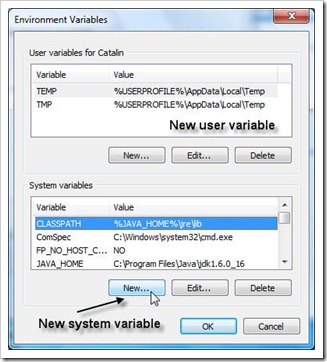
4.   In the System variables section it is selected New
5.   Define the variable name, JAVA_HOME and its value C:\Program Files\Java\jdk1.6.0_16 (for this example JDK version 1.6.0 was installed in C:\Program Files\Java\jdk1.6.0_16 folder; if needed, modify this value to reflect the real situation)
6. Insert a new system variable named, CLASSPATH and its value %JAVA_HOME%\jre\lib
New system variable
New system variable

7. For PATH, if it already exists, select it and choose the Edit option; in the editor add the value;%JAVA_HOME%\bin (the new values are separated by a semicolon from the existing ones)
Testing the system variables is done by opening a new command prompt window (Start -> cmd) and trying to launch the compiler with the command:
C:\Users\Catalin>javac
Usage: javac
where possible options include:
  -g                         Generate all debugging info
...
or, by using next commands
C:\Users\Catalin>echo %CLASSPATH%
C:\Program Files\Java\jdk1.6.0_16\jre\lib
 
C:\Users\Catalin>echo %JAVA_HOME%
C:\Program Files\Java\jdk1.6.0_16
 
C:\Users\Catalin>echo %PATH%
8. Restart the computer in order to make your system aware of these change.